This is a tool to calculate the sa-ves as assessed by the patient. Please select for each area 1 picture. reset
Instructions
Instructions VES-calculator
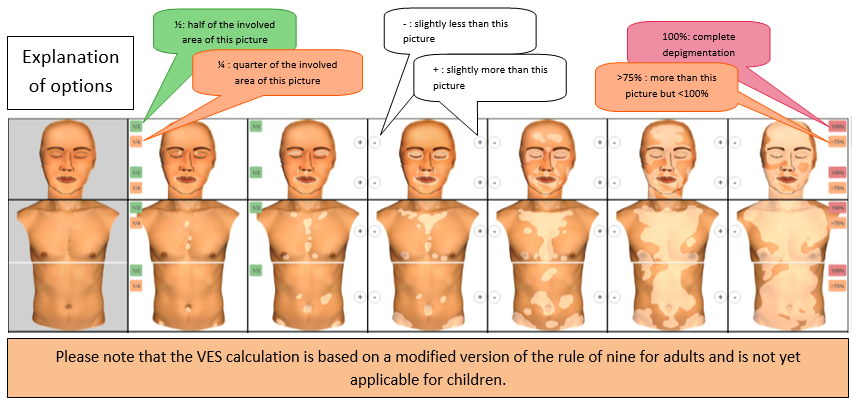
Please select for each area one picture, which best represents the extent of your patient’s vitiligo lesions. In order to ensure a more accurate calculation, each picture gives you several options that can be selected if necessary, as shown below.
For example, in the second column you can select an additional option if the vitiligo covers half (½) or a quarter (¼) of the involved area shown in the picture. In the fourth column e.g. you can choose a second option if the extent of the lesions is slightly less (-) or more (+) than the involved area shown in the picture. In the last column you can select “>75%” as a second option if the involved area is more than shown in the picture, but less than 100%. In case of complete depigmentation you can select “100%”.
After choosing a picture or a second option (if needed), the score [i.e. percentage of body surface area (BSA) involved] will be automatically calculated. If no picture or second option is selected, this will automatically result in 0% of body surface area involved.
Instructions
Instructions SA-VES calculator
The SA-VES is the Self Assessment Vitiligo Extent Score as assessed by the patient on a printed version of the tool (see blank PDF at the last tab: ‘overview’ page). We recommend to introduce the scoring sheet in advance to your patient and to indicate the right to refuse filling it out.
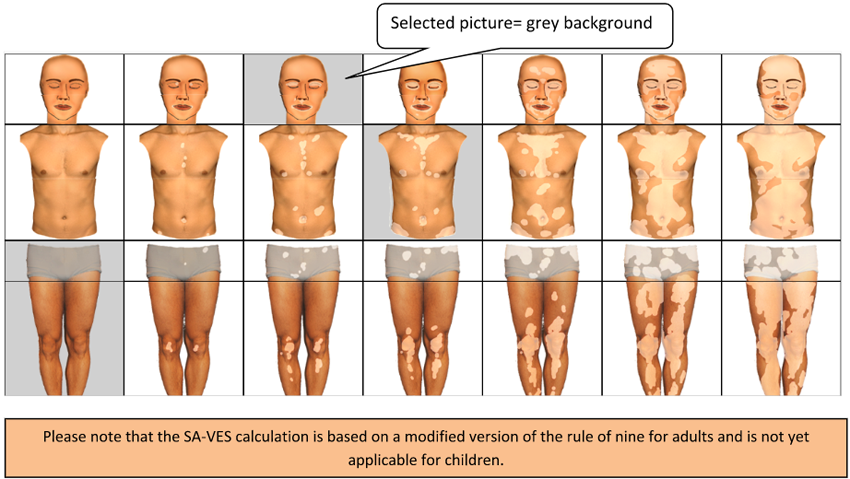
To calculate the score, the pictures that best represent the extent of the vitiligo lesions according to the patient’s opinion can be selected by this digital tool (SA-VES calculator). The background of the selected pictures will shift from white into grey.
After choosing the pictures, the score [i.e. percentage of body surface area (BSA) involved] will be automatically calculated. If no picture is selected, this will automatically result in 0% of body surface area involved.
Instructions
Instructions VESplus-calculator
Please select for each area one picture, which best represents the extent of your patient’s vitiligo lesions.
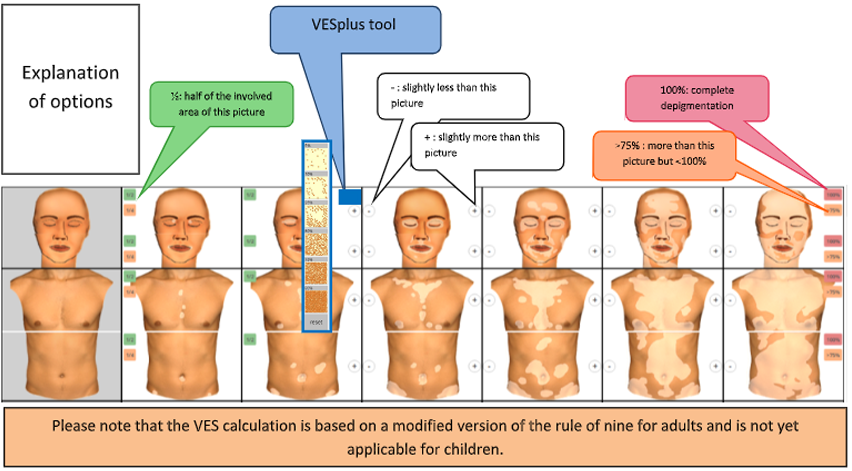
In order to ensure a more accurate calculation, each picture gives you several options that can be selected if necessary, as shown below. For example, in the second column you can select an additional option if the vitiligo covers half (½) or a quarter (¼) of the involved area shown in the picture. In the fourth column e.g. you can choose a second option if the extent of the lesions is slightly less (-) or more (+) than the involved area shown in the picture. In the last column you can select “>75%” as a second option if the involved area is more than shown in the picture, but less than 100%. In case of complete depigmentation you can select “100%”.
VESplus option: 
You can use the VESplus tool optionally by selecting the blue button. This option can be selected if you prefer to add perifollicular (re)pigmentation to the selected picture. The most applicable degree of pigmentation (between 5% to 90%) needs to be selected on the perifollicular (re)pigmentation scale that appears.
After choosing a picture or a second option (if needed), the score [i.e. percentage of body surface area (BSA) involved] will be automatically calculated. If no picture or second option is selected, this will automatically result in 0% of body surface area involved.
Vitiligo Extent Score
| Body part (front) | BSA | Grade |
|---|---|---|
| Face | ||
| Trunk | ||
| Waist | ||
| Legs (front) | ||
| Feet | ||
| Hands | ||
| Axillae | ||
| Arms (front) | ||
| Total Front | ||
| Body part (back) | BSA | Grade |
| Back | ||
| Gluteal | ||
| Legs (back) | ||
| Arms (back) | ||
| Total Back | ||
| Total |
BSA Per Region
| Region | BSA |
|---|---|
| Face | |
| Trunk (including front and back side trunk and waist) | |
| Extremities (including legs, arms, axillae) | |
| Feet | |
| Hands (left & right) | |
| Total |
Summary
BSA Front & Back
| Total BSA(%) Front: | |
| Total BSA(%) Back: | |
| Total BSA: |
Download PDF
Generate a PDF containing a full report of the calculated SA-VES.
Download a blank version of the SA-VES tool to print
Use this template to mark the Vitiligo Extent and calculate the score later.
DOWNLOAD